Articles

July 8, 2019

Laravel Passport - Column Validation Overrides

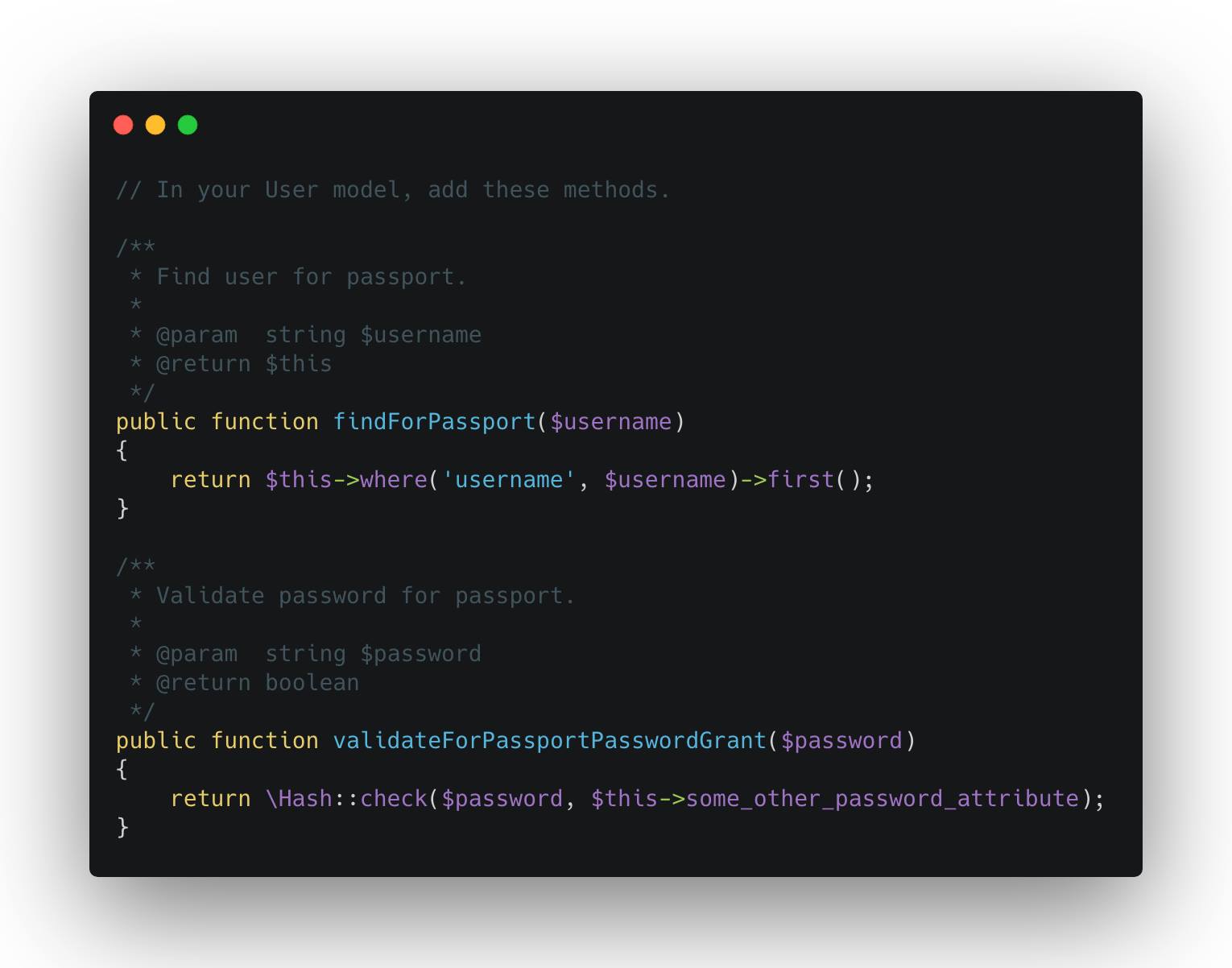
When using Laravel Passport, you can override the columns that you use to validate username and password for password grant clients (default is email and password) by adding these methods on your User model. // Within your User model, add the following methods.. use Illuminate\Support\Facades\Hash; ... public function findForPassport($username) { return $this->where('other_username_column', $username)->first(); } public function validateForPassportPasswordGrant($password) { return Hash::check($password, $this->some_other_password_attribute); } Source: `Laravel\Passport\Bridge\UserRepository@getUserEntityByUserCredentials`

April 12, 2019

Other Uses of Laravel Macros

You can utilise Laravel macro to extract properties from vendor classes that you won't normally have access to. Of course, given that the vendor class is using the Macroable trait. ![Macro](https://marvinquezon.com/storage/uploads/macro.jpg)

March 3, 2019

Pivot Model and Events

With the recent **Laravel 5.8 release**, it is now a lot easier to listen for **Eloquent Pivot** events. There are a lot of ways on how you can listen to Pivot Events and here's one way using Model Observers. Also, if you did not know, you can define a model for your pivot table using the following command `php artisan make:model PivotModelName --pivot`. An Eloquent model will be generated which you can use to define relationships back to owning Models. **ProTip:** This is really useful especially if you have 3 or more owning Models in a Pivot table. ![Pivot Model Events](https://marvinquezon.com/storage/Nr0j7qg3VQGlMBj0eq10zw892c5bvx5sQZ9PwGk1.jpeg)

February 24, 2019

Knowing How To Learn

Okay, so this post will highlight something that I think is not being discussed enough, not just in Laravel, but in programming field in general. And this is very much applicable to those who are still studying and fresh grads. Someone, a while ago, just ranted to me something in the lines of *"nakakainis po kasi hindi po tinuro sa amin to sa college" (it's annoying because it wasn't taught to us in college)*. Now look, first and foremost I think one, if not the most, important skill of a good programmer is **knowing how to learn**. That means your willingness and ability to research and discover things on your own. Let me tell you that there are a lot of people in this field who either did not go through college, did not finish college or had a completely different degree in college, but are notably successful, just because they know how to learn. As someone who often screens people for developer position, I weigh too much on the candidate's ability to adapt and learn things. I do not ask candidates during the interview "did your college teach you about interfaces?", instead I ask "do you know about interfaces?". Because this field does not care how you gained such knowledge, this field cares if you already know it or at least willing to know it. And if your answer to those types of questions is along the lines of *you don't know it because your college did not teach you* then do not expect a callback from your interviewer. Second, the point of going through a computer college is not to spoon feed you all the skills that you need to be successful on the field. The point is so you could **acquire the ability to learn on your own**. Computer colleges will give you the fundamentals, but it's up to you to expand your knowledge around what you've learned. Technology improves so fast that you can't really expect your college curriculum to be up-to-date. So if you are the type of person who is lazy, or hates reading and researching, or used to getting spoon fed in high school then better shift to another course because you'll just waste your parents' money on this field.

January 6, 2019

The Illuminate Manager Class

`Illuminate\Support\Manager::class` is an abstract class that you can inherit from to assist you in constructing your own manager implementation for your drivers. This class only requires you to implement `getDefaultDriver()` method in your own class. Creating drivers can either be by using closure, or declaring a `create{DriverName}Driver` in your manager implementation. One good example of concrete implementation is Laravel's `Illuminate\Hashing\HashManager::class`, which inherits from `Manager::class` and shows you how to manage your drivers. **P.S:** I know, I know! Code to interface not inheritance. First, you can still code to interface while inheriting from this class. Also, this is just an optional approach for creating manager classes, so it's still up to you as a developer.

October 10, 2018

Dynamic Query Scopes

Long controller methods and complicated queries often times go hand in hand. One of the common reasons I see is that developers don't utilize dynamic scopes for their models enough (or at all). As a rule of thumb, whenever I find 'where' query calls that needs a callback, I usually do throw that into a scope. I find this most common when I need to do some sort of constraint on the relationship. Throwing your query calls into a scope abstracts the actual implementation, and you can just re-use the scope whenever you want. ## Example: We are developing a medical service app and we are tasked to get all the doctors having cases assigned to the current authenticated doctor and include a count of cases assigned by each doctor. Our original implementation goes like this.. use App\Models\Doctor; use Illuminate\Support\Facades\Auth; ... public function index() { return Doctor::whereHas('cases', function ($query) { $query->where('assignee_id', Auth::id()); }) ->withCount(['cases' => function ($query) { $query->where('assignee_id', Auth::id()); }]) ->get(); } This implementation isn't bad at all. However, reading this takes a while to process what this code is trying to accomplish. Also, if we are going to use the scope on other places aside from the `index()` method, it makes more sense to just extract it to a scope. Let's see how we can refactor this.. use App\Models\Doctor; use Illuminate\Support\Facades\Auth; ... public function index() { return Doctor::onlyWithCasesAssignedTo(Auth::user()) ->withCountOfCasesAssignedTo(Auth::user()) ->get(); } // Then in our Doctor model, we add couple of query scopes.. use Illuminate\Database\Eloquent\Builder; ... public function scopeOnlyWithCasesAssignedTo(Builder $query, Doctor $doctor) { return $query->whereHas('cases', function ($query) { $query->where('assignee_id', $doctor->id); }); } public function scopeWithCountOfCasesAssignedTo(Builder $query, Doctor $doctor) { return $query->withCount(['cases' => function ($query) { $query->where('assignee_id', Auth::id()); }]); } And there you go! We've successfully extracted the complicated queries from our controller to their dedicated query scope methods. Cheers!

September 19, 2018

Rendering and Reporting Exceptions

If you need a more robust reporting of your Exceptions, you can just add a report() method to your exception classes. Laravel will auto-detect that (and the render method) and run the logic inside. What's the difference between render and report in Exception classes? In render method you will typically want to return a response of some type (json/view), while report method you will typically want to Log the exception (file/database). And if you are using some 3rd party reporting tool like Sentry or Bugsnag you will want to call that in the report method as well. ``` use Exception; use Illuminate\Support\Facades\Log; class FooException extends Exception { /** * Report the exception. * * @return void */ public function report() { // Using simple Log Log::warning($this->getMessage()); // Using 3rd party integration like Sentry or Bugsnag app('sentry')->captureException($this); } } ```

Marvin Quezon · Copyright © 2025 · Privacy · Sitemap